Changelog
What's new in Yolando
Stay up to date with our latest releases, improvements, and product updates.
March 4, 2026
A new Overview dashboard, Strategy-aware Recommendations, Content Hub upgrades, and more
Version 2.146
The new Overview dashboard
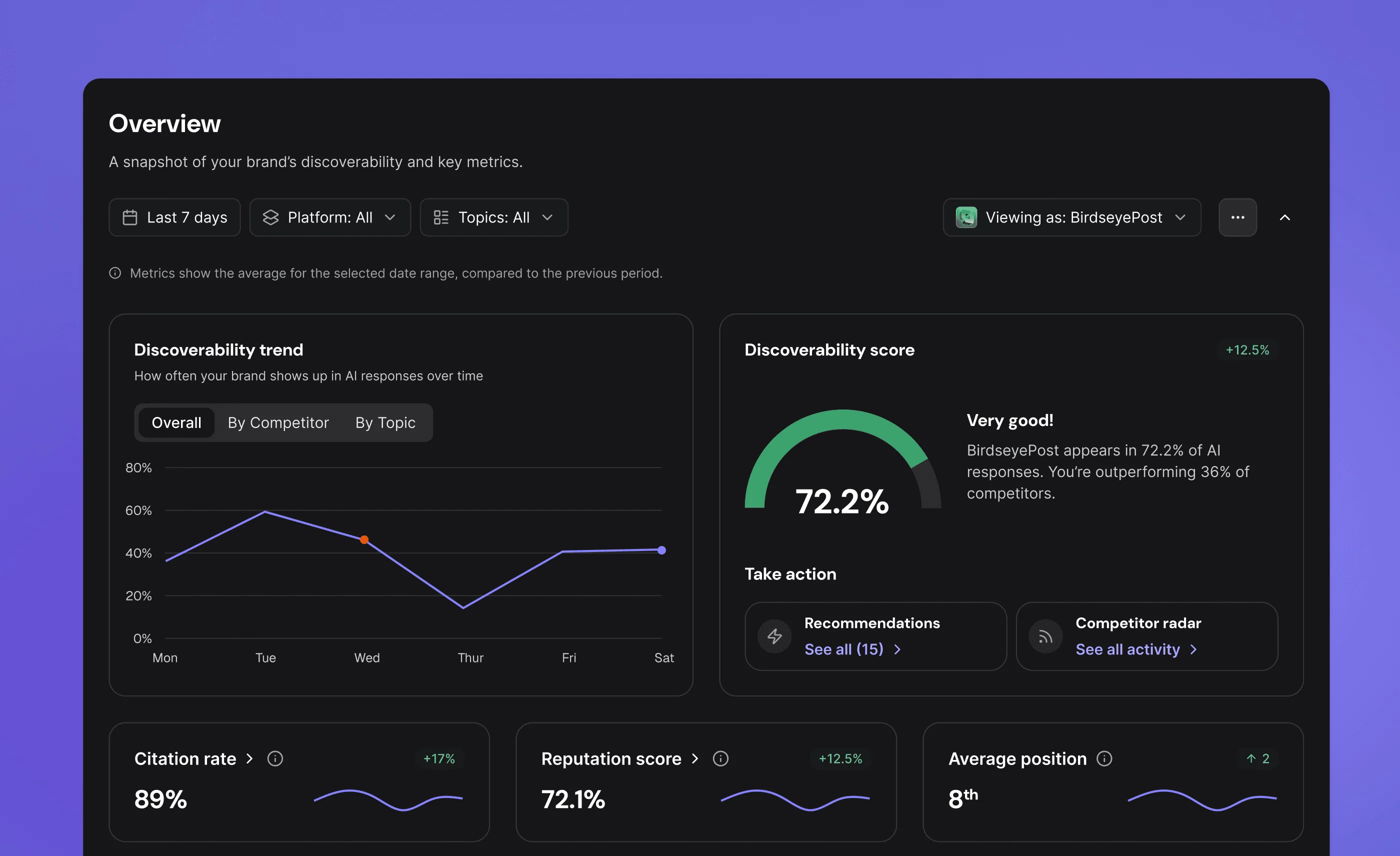
Your AI Discoverability dashboard has been rebuilt from the ground up. Four metrics now live side-by-side as time series in a single view: Share of Voice, Citation Rate, Reputation Score, and Discoverability. You can read your trajectory at a glance and spot where to dig in.
A new Average Position card replaces the old Share of Voice card with cleaner deltas, and a redesigned Discoverability leaderboard ranks you against the competitors you're tracking with a per-brand breakdown. Layout, typography, and responsive behavior have all been refreshed, and a backend query rewrite trims roughly fifteen seconds off the Overview's load time.
Strategy-aware Recommendations
Recommendations just got smarter and more actionable. The new scoring engine weighs every recommendation across five dimensions: Impact (30%), Urgency (25%), Strategic Alignment (20%), Feasibility (15%), and Differentiation (10%). Each suggestion now factors in your strategy memory (your product priorities, key themes, and competitive position), so the work that surfaces is the work that actually moves your brand forward.
Titles are now action-led too. Instead of describing the opportunity, recommendation headlines tell you exactly what to do, in your voice, verb-first.
Content Hub workflow upgrades
Settle into focus mode. Any content item now opens into a full-page editing view with a single click of the expand button. Sidebar nav stays put, the browser back button works as expected, and you've got plenty of room to actually write.
Need more space for the editor, or more space for AI chat? The divider between them is now draggable, so you can set the split exactly how you like it. The details panel got a refresh too: "Content goal" has been renamed to Content guidance wherever it appears, and long guidance copy now collapses to six lines with a Show more / Show less toggle so the panel stays clean even on long briefs.
Higher-quality content end-to-end — Generated content now spells out acronyms on the first use, runs deterministic citation checking and repair so it doesn't reference fabricated sources, and no longer leaks AI reasoning into social-post output. Smarter slug generation (concise, keyword-first, stop-word-aware), paragraph-format FAQ answers, and improved web crawl summarization round out the batch.
Improved prompt generation — Newly generated prompts now use ICP calibration data from your strategy memory (product priorities, key themes, competitor intel), and you can finally edit a prompt's funnel stage directly from the edit modal.
Collapsible sticky headers — On Dashboard, Recommendations, Content Hub, and Competitor Radar, you can now collapse the sticky header to reclaim vertical space. The new frosted-glass header stays out of the way as you scroll.
Video length estimate for scripts — When writing a video script, the additional settings panel now shows estimated runtime in minutes as you adjust the word-count slider.
UI polish across the app — Dynamic, clickable breadcrumbs, more visible scrollbars on hover, refreshed Top Cited Domains table, tightened combobox footer padding, hover states on delete buttons, single-competitor track-modal copy, and dozens of smaller fixes throughout.
The new Overview dashboard
Your AI Discoverability dashboard has been rebuilt from the ground up. Four metrics now live side-by-side as time series in a single view: Share of Voice, Citation Rate, Reputation Score, and Discoverability. You can read your trajectory at a glance and spot where to dig in.
A new Average Position card replaces the old Share of Voice card with cleaner deltas, and a redesigned Discoverability leaderboard ranks you against the competitors you're tracking with a per-brand breakdown. Layout, typography, and responsive behavior have all been refreshed, and a backend query rewrite trims roughly fifteen seconds off the Overview's load time.
Strategy-aware Recommendations
Recommendations just got smarter and more actionable. The new scoring engine weighs every recommendation across five dimensions: Impact (30%), Urgency (25%), Strategic Alignment (20%), Feasibility (15%), and Differentiation (10%). Each suggestion now factors in your strategy memory (your product priorities, key themes, and competitive position), so the work that surfaces is the work that actually moves your brand forward.
Titles are now action-led too. Instead of describing the opportunity, recommendation headlines tell you exactly what to do, in your voice, verb-first.
Content Hub workflow upgrades
Settle into focus mode. Any content item now opens into a full-page editing view with a single click of the expand button. Sidebar nav stays put, the browser back button works as expected, and you've got plenty of room to actually write.
Need more space for the editor, or more space for AI chat? The divider between them is now draggable, so you can set the split exactly how you like it. The details panel got a refresh too: "Content goal" has been renamed to Content guidance wherever it appears, and long guidance copy now collapses to six lines with a Show more / Show less toggle so the panel stays clean even on long briefs.
Higher-quality content end-to-end — Generated content now spells out acronyms on the first use, runs deterministic citation checking and repair so it doesn't reference fabricated sources, and no longer leaks AI reasoning into social-post output. Smarter slug generation (concise, keyword-first, stop-word-aware), paragraph-format FAQ answers, and improved web crawl summarization round out the batch.
Improved prompt generation — Newly generated prompts now use ICP calibration data from your strategy memory (product priorities, key themes, competitor intel), and you can finally edit a prompt's funnel stage directly from the edit modal.
Collapsible sticky headers — On Dashboard, Recommendations, Content Hub, and Competitor Radar, you can now collapse the sticky header to reclaim vertical space. The new frosted-glass header stays out of the way as you scroll.
Video length estimate for scripts — When writing a video script, the additional settings panel now shows estimated runtime in minutes as you adjust the word-count slider.
UI polish across the app — Dynamic, clickable breadcrumbs, more visible scrollbars on hover, refreshed Top Cited Domains table, tightened combobox footer padding, hover states on delete buttons, single-competitor track-modal copy, and dozens of smaller fixes throughout.
March 13, 2026
Competitor Radar, Website Vitals, and more
Version 2.146
Competitor Radar
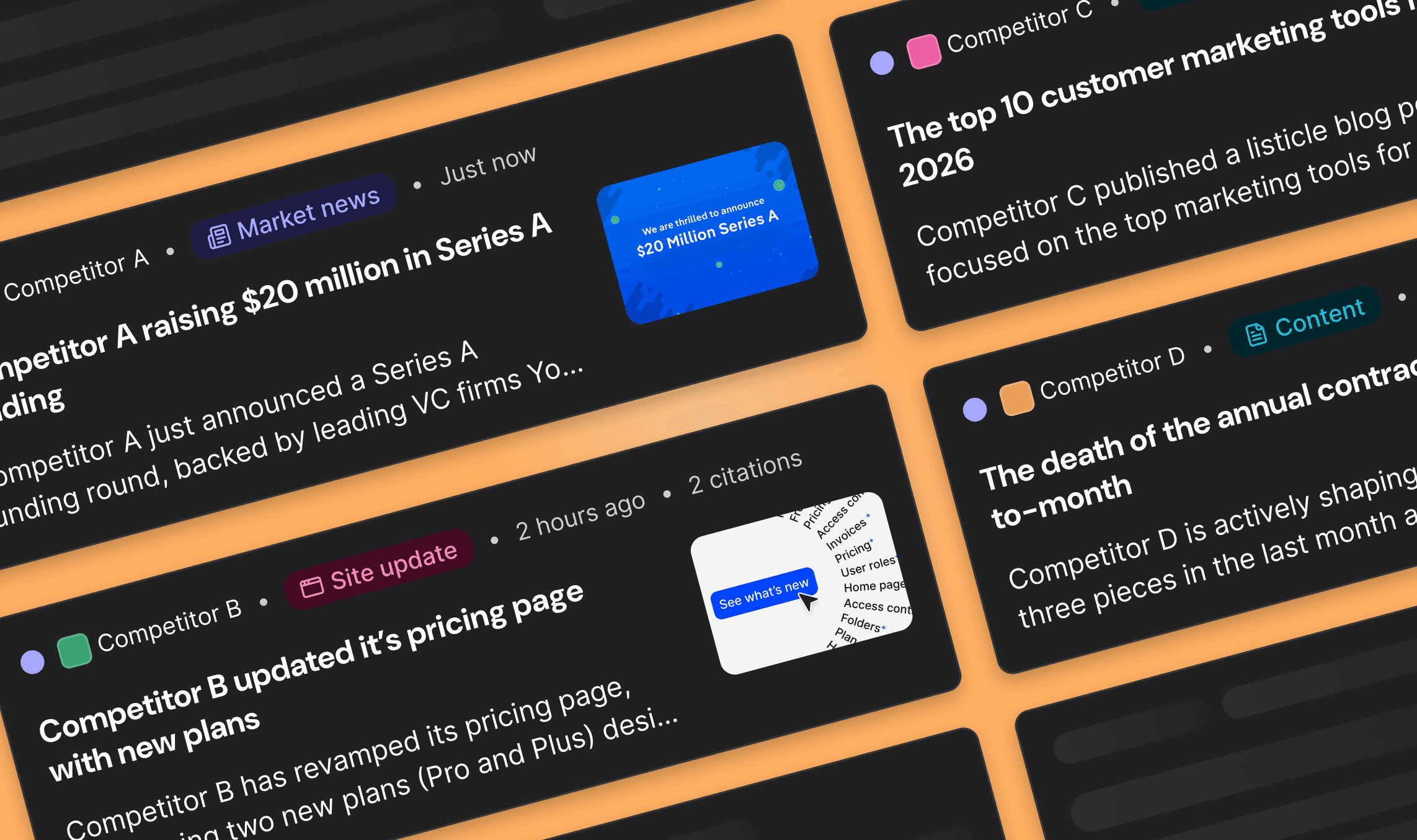
Know what your competitors are doing — before it impacts you. Competitor Radar continuously monitors your competitive landscape and surfaces the signals that matter: new content, site changes, market news, and emerging themes, all ranked by relevance to your category.
Website Vitals
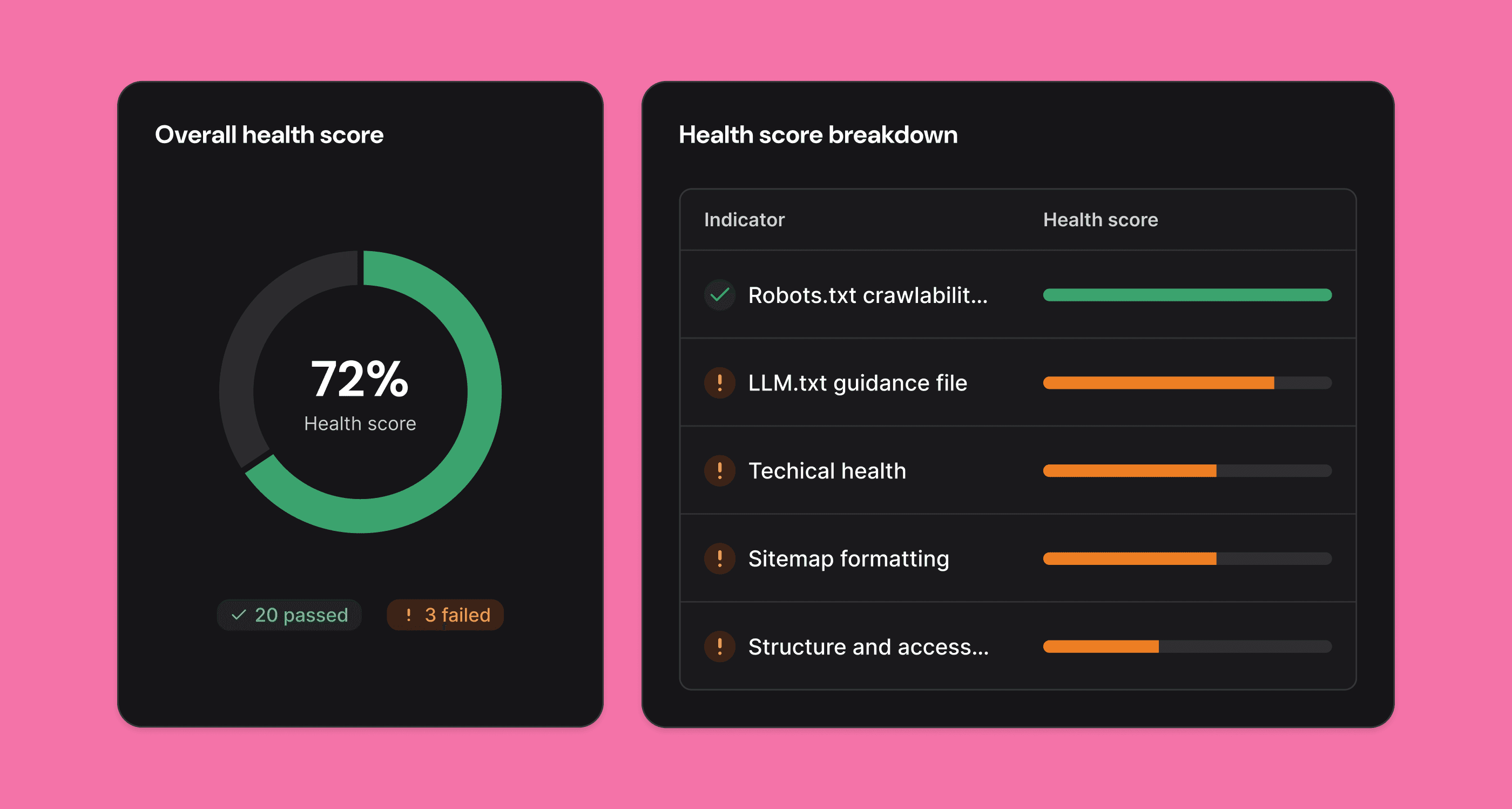
Get a clear, actionable picture of how your website is performing in the eyes of AI. Website Vitals audits your site and surfaces what's helping — or hurting — your discoverability across AI platforms.
New in this release: llms.txt generation lets you publish a machine-readable description of your site purpose-built for LLM crawlers, the emerging standard for telling AI platforms who you are and what you do. Generate one on demand, directly from Website Vitals.
AI chat memory — The Content Hub AI now retains context across sessions and writes in your Brand Voice from the first message.
Pinned columns & pagination in tables — Data tables now support frozen columns and a page size selector for cleaner work with large datasets.
Real-time generation status — Toast notifications and progress indicators give live feedback while content is being generated.
Brand Voice onboarding prompt — After onboarding, you're prompted to review your generated Brand Voice before it's applied.
UI polish — Scrollbar fixes, cursor pointers added app-wide, sheet opening no longer jumps the background, and responsive sidebar improvements.
Bug fixes — Welcome email links, competitor sorting, icon rendering, and radar bookmark behavior all addressed.
Competitor Radar
Know what your competitors are doing — before it impacts you. Competitor Radar continuously monitors your competitive landscape and surfaces the signals that matter: new content, site changes, market news, and emerging themes, all ranked by relevance to your category.
Website Vitals
Get a clear, actionable picture of how your website is performing in the eyes of AI. Website Vitals audits your site and surfaces what's helping — or hurting — your discoverability across AI platforms.
New in this release: llms.txt generation lets you publish a machine-readable description of your site purpose-built for LLM crawlers, the emerging standard for telling AI platforms who you are and what you do. Generate one on demand, directly from Website Vitals.
AI chat memory — The Content Hub AI now retains context across sessions and writes in your Brand Voice from the first message.
Pinned columns & pagination in tables — Data tables now support frozen columns and a page size selector for cleaner work with large datasets.
Real-time generation status — Toast notifications and progress indicators give live feedback while content is being generated.
Brand Voice onboarding prompt — After onboarding, you're prompted to review your generated Brand Voice before it's applied.
UI polish — Scrollbar fixes, cursor pointers added app-wide, sheet opening no longer jumps the background, and responsive sidebar improvements.
Bug fixes — Welcome email links, competitor sorting, icon rendering, and radar bookmark behavior all addressed.
February 26, 2026
Gong Integration, Smarter AI Chat, Mobile Support, and more
Versions 2.141–2.144
Yolando <> Gong Integration (Beta)
Connect your Gong account and start syncing call transcripts, insights, and metadata directly into Yolando. The new integration lives in Settings under Integrations — connect with one click via OAuth, and your call data syncs automatically in the background.
This is the foundation for surfacing customer and prospect conversations alongside your competitive intelligence, bridging the gap between what AI platforms say and what your market is telling you on calls.
*Only available on Managed plans
Smarter AI Chat + Content Editor Enhancements
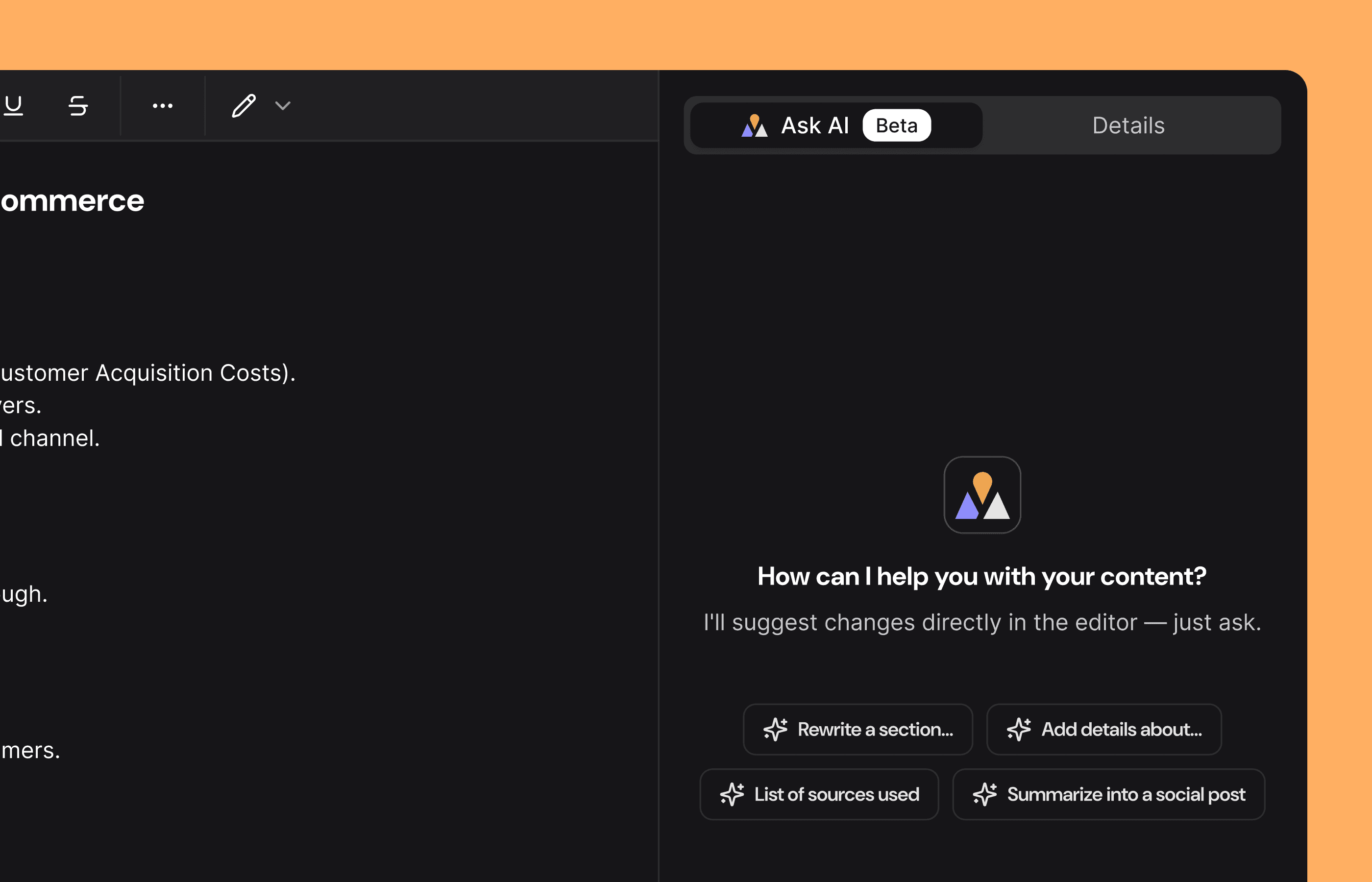
The AI chat in the Content Editor is now powered by Opus 4.6, with live web search, so it can pull in real-time information while helping you write.
The accept/reject flow for AI-suggested edits has been redesigned for clarity, and a wave of editor fixes makes the whole experience smoother: Cmd+Z undo now works after AI edits, content appears instantly after generation, and the AI no longer suggests unverified links.
Mobile Responsiveness (Beta)
The full Yolando webapp is now usable on smaller screens. Tables scroll horizontally, layouts adapt cleanly, and a new mobile gateway screen guides users on viewports below 768px. Whether you're checking metrics on a tablet or scanning your feed on the go, the experience holds up.
Duplicate brand voice — Quickly clone an existing brand voice as a starting point.
Accept/Reject Suggestions in AI Chat — You can now accept or reject all AI-suggested changes directly from the chat panel, without switching views.
Change password — You can now change your password or set one after signing up with Google.
Smoother page transitions — A new top-loading progress bar gives clear feedback when navigating between pages.
Faster citation metrics — The citation pipeline has been overhauled for significantly faster loading.
Dozens of UI fixes — Tooltip corrections, avatar rendering, calendar picker improvements, skeleton loader consistency, and more polish throughout.
Yolando <> Gong Integration (Beta)
Connect your Gong account and start syncing call transcripts, insights, and metadata directly into Yolando. The new integration lives in Settings under Integrations — connect with one click via OAuth, and your call data syncs automatically in the background.
This is the foundation for surfacing customer and prospect conversations alongside your competitive intelligence, bridging the gap between what AI platforms say and what your market is telling you on calls.
*Only available on Managed plans
Smarter AI Chat + Content Editor Enhancements
The AI chat in the Content Editor is now powered by Opus 4.6, with live web search, so it can pull in real-time information while helping you write.
The accept/reject flow for AI-suggested edits has been redesigned for clarity, and a wave of editor fixes makes the whole experience smoother: Cmd+Z undo now works after AI edits, content appears instantly after generation, and the AI no longer suggests unverified links.
Mobile Responsiveness (Beta)
The full Yolando webapp is now usable on smaller screens. Tables scroll horizontally, layouts adapt cleanly, and a new mobile gateway screen guides users on viewports below 768px. Whether you're checking metrics on a tablet or scanning your feed on the go, the experience holds up.
Duplicate brand voice — Quickly clone an existing brand voice as a starting point.
Accept/Reject Suggestions in AI Chat — You can now accept or reject all AI-suggested changes directly from the chat panel, without switching views.
Change password — You can now change your password or set one after signing up with Google.
Smoother page transitions — A new top-loading progress bar gives clear feedback when navigating between pages.
Faster citation metrics — The citation pipeline has been overhauled for significantly faster loading.
Dozens of UI fixes — Tooltip corrections, avatar rendering, calendar picker improvements, skeleton loader consistency, and more polish throughout.
February 13, 2026
Content Editor AI Chat, Prompt Deltas, and more
Version 2.140
Content Editor AI Chat
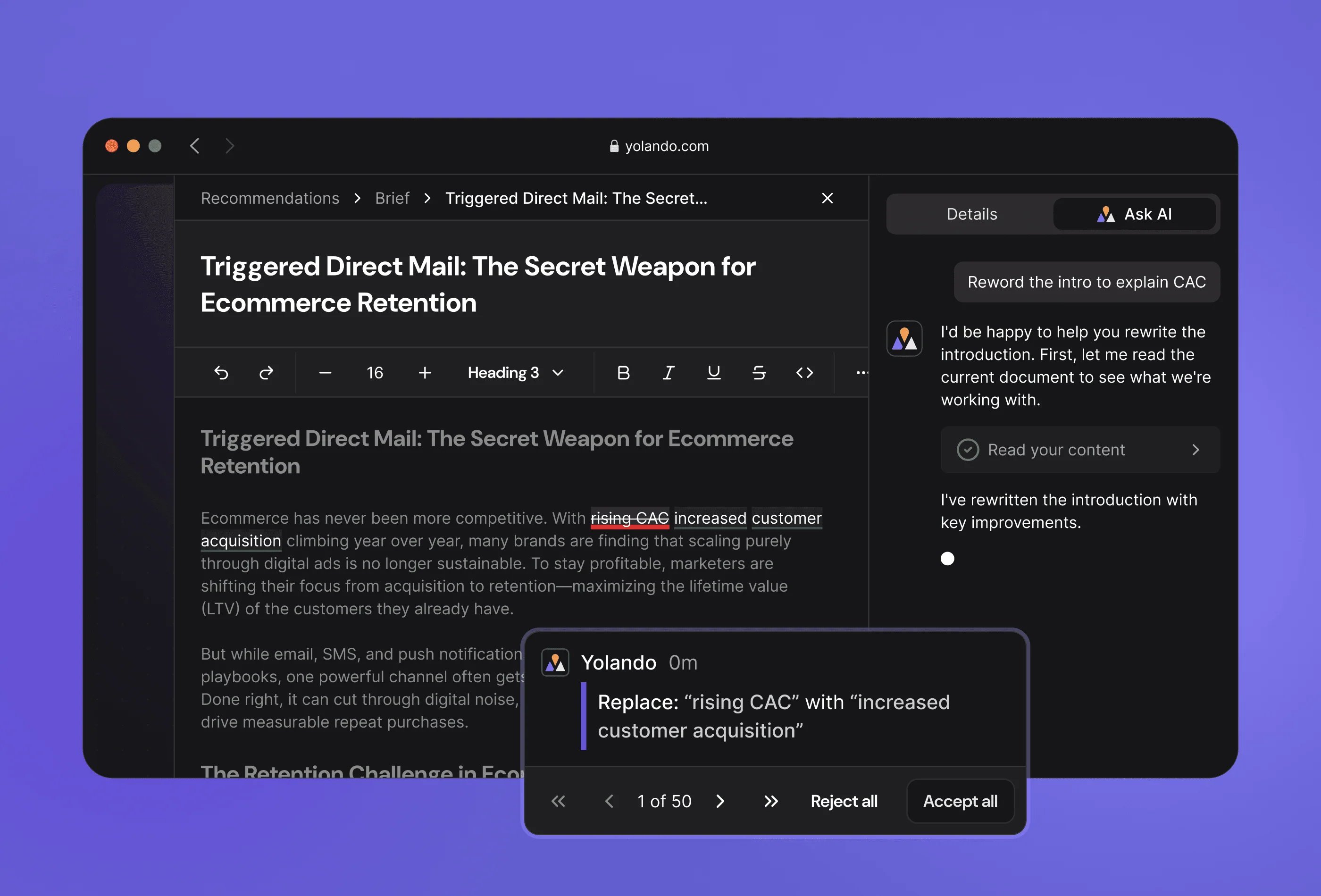
Content creation just got a whole lot easier. A new AI-powered chat now lives right inside the Content Hub editor, so you can brainstorm ideas, request rewrites, and refine your messaging through natural conversation — without ever leaving the page.
When the AI suggests an edit, you'll see a clean inline diff so you can review exactly what changed and accept it with a single click. No more copying between tools or losing your place. Just ask, review, and publish.
Prompt Page Deltas
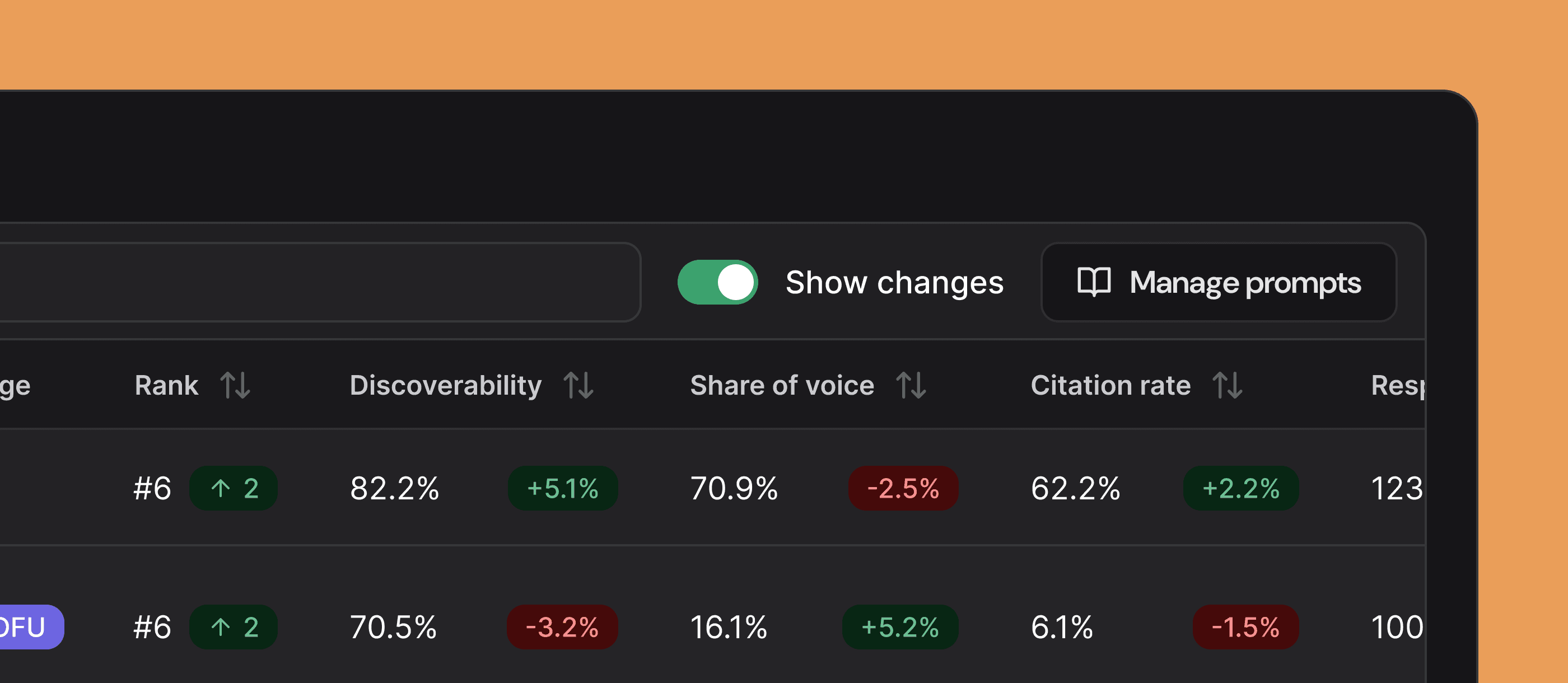
The Topics & Prompts tab now has a Show Changes toggle that reveals how your per-prompt metrics have shifted over time. Color-coded delta badges on every metric column make it easy to spot gains, catch declines, and measure the impact of your optimization work at a glance.
Compare across 30-, 60-, or 90-day windows, and your preferred view sticks as you navigate — no need to re-toggle every time.
Faster app startup — Performance improvements so you spend less time waiting.
Dozens of UI polish fixes — Smoother scrolling, cleaner tooltips, tighter layouts, and fewer visual glitches across the dashboard, editor, charts, and sidebar.
Brand Share of Voice chart — See how your brand stacks up on the Overview page.
Content Editor AI Chat
Content creation just got a whole lot easier. A new AI-powered chat now lives right inside the Content Hub editor, so you can brainstorm ideas, request rewrites, and refine your messaging through natural conversation — without ever leaving the page.
When the AI suggests an edit, you'll see a clean inline diff so you can review exactly what changed and accept it with a single click. No more copying between tools or losing your place. Just ask, review, and publish.
Prompt Page Deltas
The Topics & Prompts tab now has a Show Changes toggle that reveals how your per-prompt metrics have shifted over time. Color-coded delta badges on every metric column make it easy to spot gains, catch declines, and measure the impact of your optimization work at a glance.
Compare across 30-, 60-, or 90-day windows, and your preferred view sticks as you navigate — no need to re-toggle every time.
Faster app startup — Performance improvements so you spend less time waiting.
Dozens of UI polish fixes — Smoother scrolling, cleaner tooltips, tighter layouts, and fewer visual glitches across the dashboard, editor, charts, and sidebar.
Brand Share of Voice chart — See how your brand stacks up on the Overview page.
February 6, 2026
Reputation Tab, Billing Portal, and more
Version 2.139
Reputation Tab
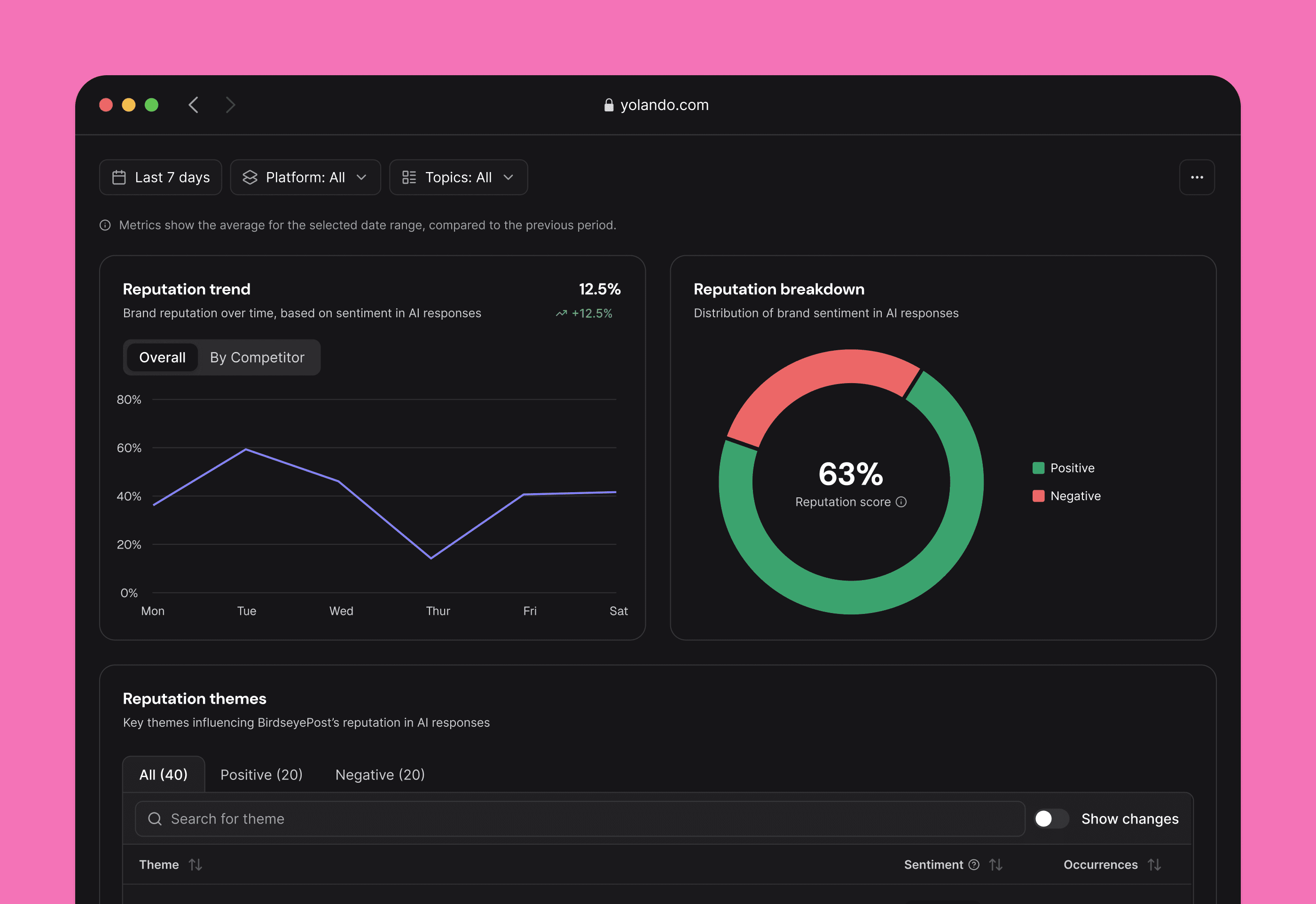
Your brand's reputation across AI platforms is now fully visible. The new Reputation Tab shows how your brand — and your competitors — are perceived, broken down by theme.
Instead of a single score, you get theme-level insights: what AI models are saying, whether it's positive or negative, and how it's changing over time. Compare across time periods with accurate historical data, so you can track the impact of your efforts.
Billing Portal
Managing your subscription is now entirely in your hands. Subscribe, upgrade, downgrade, or cancel your plan — all from within the app, no back-and-forth required.
The new billing portal handles everything from plan selection to payment management, so you're always in control of your account.
10x faster dashboard loading — Key pages now load dramatically faster thanks to backend performance optimizations.
Smarter content writing — The AI content writer has been upgraded for higher quality output with better word count accuracy.
Dozens of UI polish fixes — Improved charts, smoother navigation, better tooltips, and cleaner tables across the dashboard.
Reputation Tab
Your brand's reputation across AI platforms is now fully visible. The new Reputation Tab shows how your brand — and your competitors — are perceived, broken down by theme.
Instead of a single score, you get theme-level insights: what AI models are saying, whether it's positive or negative, and how it's changing over time. Compare across time periods with accurate historical data, so you can track the impact of your efforts.
Billing Portal
Managing your subscription is now entirely in your hands. Subscribe, upgrade, downgrade, or cancel your plan — all from within the app, no back-and-forth required.
The new billing portal handles everything from plan selection to payment management, so you're always in control of your account.
10x faster dashboard loading — Key pages now load dramatically faster thanks to backend performance optimizations.
Smarter content writing — The AI content writer has been upgraded for higher quality output with better word count accuracy.
Dozens of UI polish fixes — Improved charts, smoother navigation, better tooltips, and cleaner tables across the dashboard.
February 3, 2026
Citation Tab Redesign, and more
Version 2.138
Citation Tab Redesign
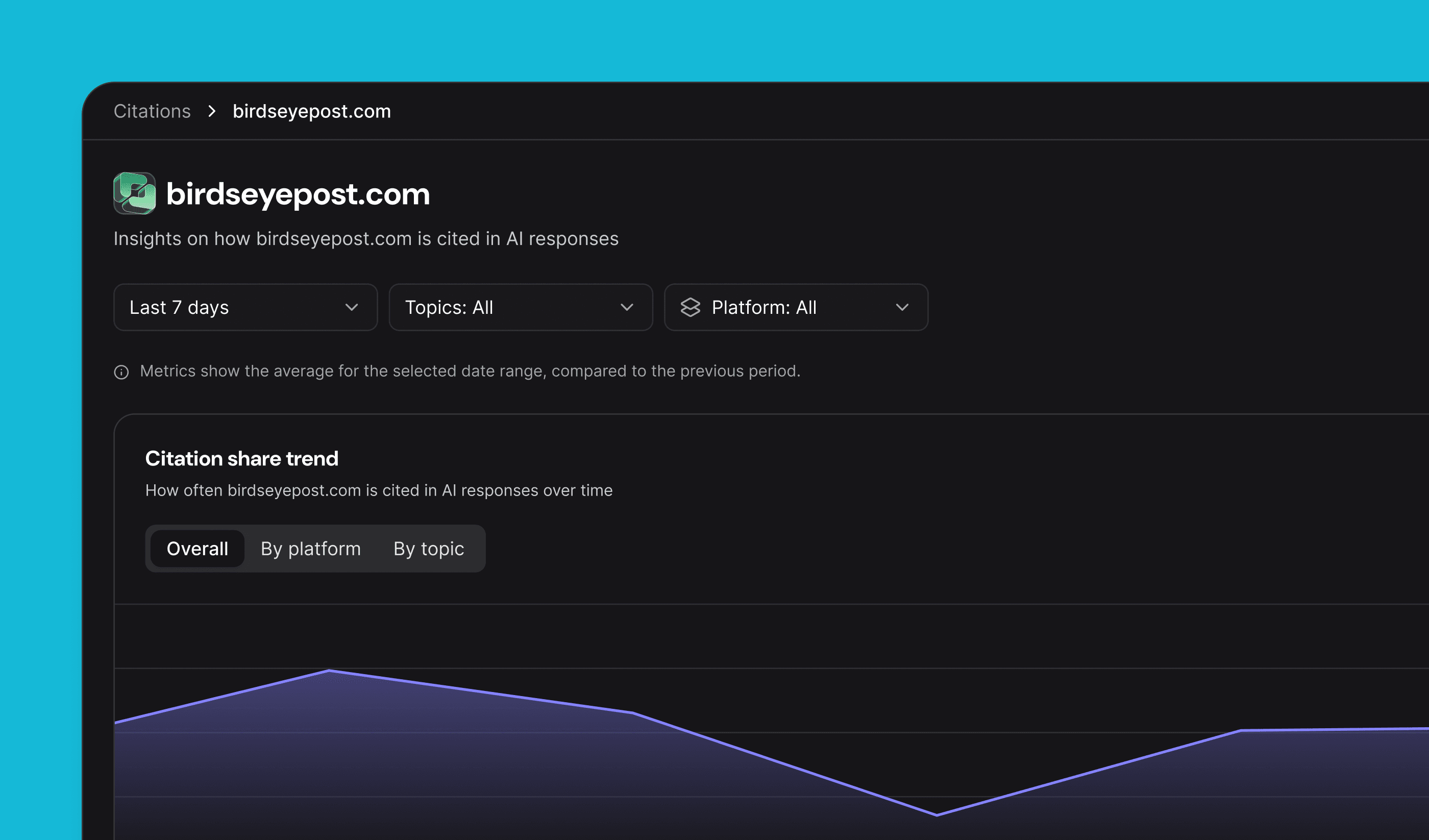
The Citations experience has been completely rebuilt. You now get domain-level analytics, competitor citation trends, and a clear breakdown of where your brand is being cited across AI platforms.
Drill into the top cited domains, view citation share by category, and track how your citation footprint is growing over 30, 90, or 365 days — all from one place.
Up to 8x Faster DashboardThe entire dashboard is dramatically faster. Pages that used to take over a minute now load in seconds. Every core view — Overview, Citations, Visibility — has been optimized so you spend less time waiting and more time acting.
Actioned recommendations — Recommendations you've already acted on now show a clear strikethrough for easier scanning.
UI polish — Improved sidebar behavior, better chart text truncation, and cleaner recommendation detail panels.
Citation Tab Redesign
The Citations experience has been completely rebuilt. You now get domain-level analytics, competitor citation trends, and a clear breakdown of where your brand is being cited across AI platforms.
Drill into the top cited domains, view citation share by category, and track how your citation footprint is growing over 30, 90, or 365 days — all from one place.
Up to 8x Faster DashboardThe entire dashboard is dramatically faster. Pages that used to take over a minute now load in seconds. Every core view — Overview, Citations, Visibility — has been optimized so you spend less time waiting and more time acting.
Actioned recommendations — Recommendations you've already acted on now show a clear strikethrough for easier scanning.
UI polish — Improved sidebar behavior, better chart text truncation, and cleaner recommendation detail panels.
January 30, 2026
Recommendations Inbox, Competitor Content Alerts, and more
Version 2.137
Recommendations Inbox
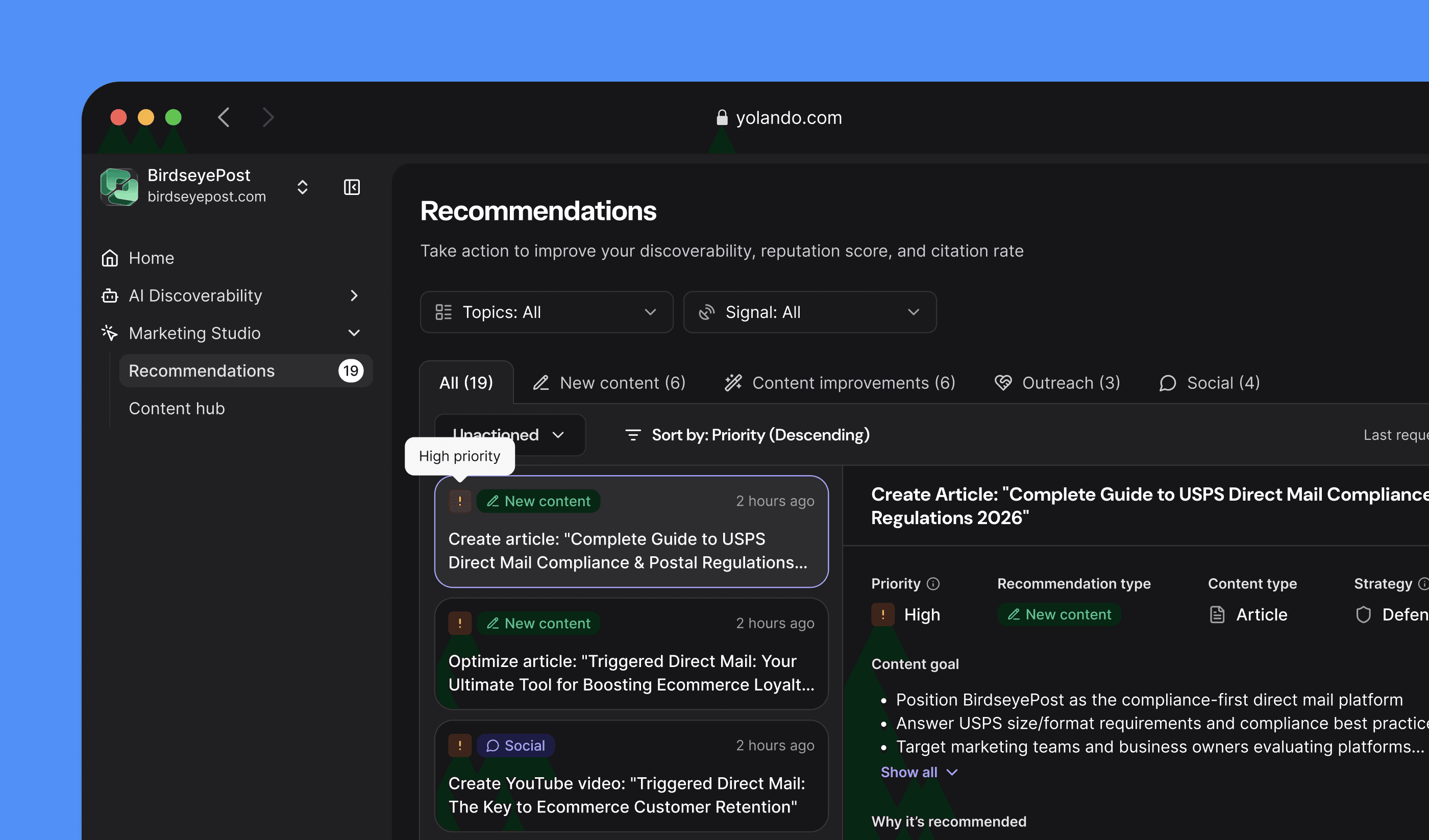
Recommendations are now a first-class workflow. The new inbox gives you a two-column layout where you can filter by actioned or unactioned status, sort by priority or date, and drill into any recommendation for full context.
Share recommendations with your team, jump directly to the related prompt, or expand into the full inbox — everything is designed to help you move from insight to action faster.
Competitor Content Signals
Get proactive recommendations when competitors publish content on topics that overlap with yours. Each alert is ranked by severity — High, Medium, or Low — based on how many pages they've published and how relevant the topic is to your strategy.
You'll see citation counts alongside competitor content, so you know which pieces are actually getting picked up by AI platforms.
Reader role improvements — Team members with read-only access now see helpful context instead of confusing disabled buttons.
Content brief fixes — The content brief form is more reliable, with better dropdowns and no more incorrectly disabled submit buttons.
42% faster test suite — Behind the scenes, we're shipping faster than ever.
Recommendations Inbox
Recommendations are now a first-class workflow. The new inbox gives you a two-column layout where you can filter by actioned or unactioned status, sort by priority or date, and drill into any recommendation for full context.
Share recommendations with your team, jump directly to the related prompt, or expand into the full inbox — everything is designed to help you move from insight to action faster.
Competitor Content Signals
Get proactive recommendations when competitors publish content on topics that overlap with yours. Each alert is ranked by severity — High, Medium, or Low — based on how many pages they've published and how relevant the topic is to your strategy.
You'll see citation counts alongside competitor content, so you know which pieces are actually getting picked up by AI platforms.
Reader role improvements — Team members with read-only access now see helpful context instead of confusing disabled buttons.
Content brief fixes — The content brief form is more reliable, with better dropdowns and no more incorrectly disabled submit buttons.
42% faster test suite — Behind the scenes, we're shipping faster than ever.
January 22, 2026
Citation-Aware Recommendations, and more
Version 2.136
Citation-Aware Recommendations
Recommendations now know which competitor content is actually getting cited by AI platforms. When we suggest a content opportunity, you'll see the evidence — which competitor pages are being cited, on which platforms, and how often.
This means you can prioritize opportunities where there's proven demand, not just theoretical overlap.
Web crawl improvements — More comprehensive site coverage with a new link discovery phase.
Chart and display fixes — Trend chart titles now show correct values, and brand name truncation is cleaner on the home page.
In-app support — New dialog makes it easier for users to get in touch.
January 17, 2026
AI Content Recommendations, Improved Brand Voice Validation, and more
Version 2.135
AI Content Recommendations
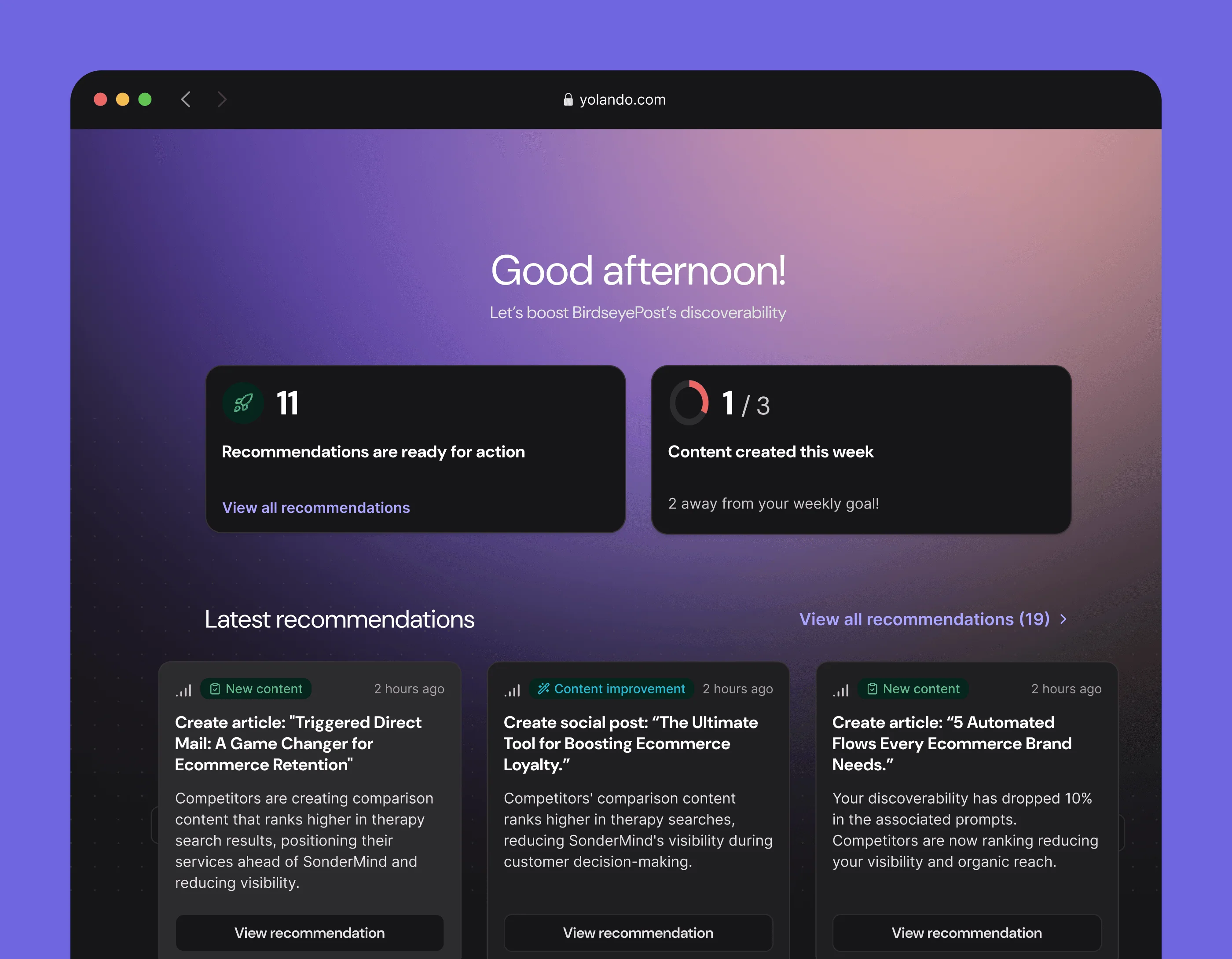
A brand-new AI-powered recommendation engine analyzes your market signals and generates actionable content suggestions. Each recommendation is backed by competitive intelligence, so you know exactly why it matters and what to write.
Smart deduplication ensures you don't see the same suggestion twice, and topic-level cooldowns prevent recommendation fatigue. Up to 20 recommendations are surfaced per brand, prioritized by impact.
Improved Brand Voice Validation
Every piece of generated content is now checked against your brand voice definition before it reaches you. The new Brand Voice Reviewer catches terminology misuse and hallucinations — so if your brand defines "GEO" as geology, the AI won't confuse it with geolocation.
The result: content that sounds like your brand from the first draft.
Faster attribution reports — The attribution page now loads in under 5 seconds, down from 35.
Loading skeletons — Home page components now show smooth loading states instead of blank space.
Rolling averages — Charts now support a rolling average toggle for cleaner trend lines.
AI Content Recommendations
A brand-new AI-powered recommendation engine analyzes your market signals and generates actionable content suggestions. Each recommendation is backed by competitive intelligence, so you know exactly why it matters and what to write.
Smart deduplication ensures you don't see the same suggestion twice, and topic-level cooldowns prevent recommendation fatigue. Up to 20 recommendations are surfaced per brand, prioritized by impact.
Improved Brand Voice Validation
Every piece of generated content is now checked against your brand voice definition before it reaches you. The new Brand Voice Reviewer catches terminology misuse and hallucinations — so if your brand defines "GEO" as geology, the AI won't confuse it with geolocation.
The result: content that sounds like your brand from the first draft.
Faster attribution reports — The attribution page now loads in under 5 seconds, down from 35.
Loading skeletons — Home page components now show smooth loading states instead of blank space.
Rolling averages — Charts now support a rolling average toggle for cleaner trend lines.
December 18, 2025
Real-Time Content Collaboration, Content Hub Updates, and more
Version 2.134
Real-Time Content Collaboration
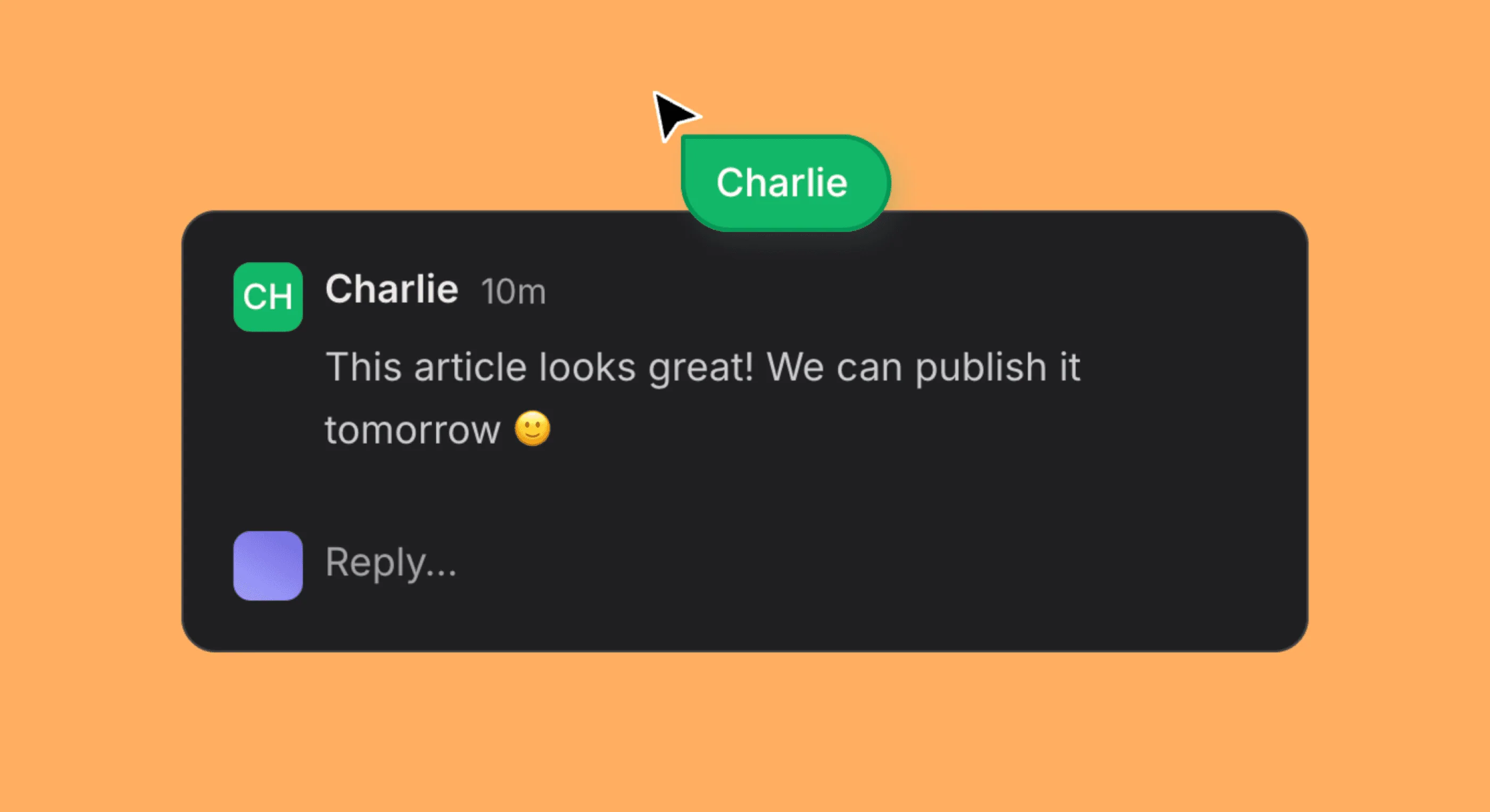
Work on content together — live. Multiple team members can now edit documents simultaneously with real-time sync. Changes to titles, status, and publication state update instantly across sessions.
Long editing sessions no longer get interrupted by expired tokens. Your session stays active in the background, so you can focus on the work instead of re-logging in.
Content Hub Updates
The content editing experience is smoother across the board. Duplicate content no longer appears in the editor, markdown renders correctly, and you'll see a clear spinner while content is being generated.
Redesigned delta badges — Change indicators now use clean +/- formatting instead of arrows for better readability.
Platform page graphs — New visualizations on the platform breakdown page.
Real-Time Content Collaboration
Work on content together — live. Multiple team members can now edit documents simultaneously with real-time sync. Changes to titles, status, and publication state update instantly across sessions.
Long editing sessions no longer get interrupted by expired tokens. Your session stays active in the background, so you can focus on the work instead of re-logging in.
Content Hub Updates
The content editing experience is smoother across the board. Duplicate content no longer appears in the editor, markdown renders correctly, and you'll see a clear spinner while content is being generated.
Redesigned delta badges — Change indicators now use clean +/- formatting instead of arrows for better readability.
Platform page graphs — New visualizations on the platform breakdown page.
December 18, 2025
Artifacts Management, Default Brand Voice, and more
Version 2.133
Artifacts Management
You can now upload, organize, and manage all of your brand resources in one place. The new Artifacts system supports file uploads and URL-based content, with clear status indicators, creator attribution, and timestamps.
Download, copy, or delete artifacts right from the table — everything you need to keep your brand library organized and up to date.
Default Brand Voice
You can now mark a brand voice as your default, and it'll be automatically applied across all content creation. Less setup per piece, more consistency across everything you publish.
Better content validation — Generated content is now reviewed against your additional instructions for higher accuracy.
Broken link removal — Auto-detected and stripped after generation so your content stays clean.
Search in Prompts Manager — Find the prompt you're looking for without scrolling.
Get your brand in the spotlight
Yolando spots emerging trends, connects the dots, and moves before the market – or your competitors – see it coming.
Get your brand in the spotlight
Yolando spots emerging trends, connects the dots, and moves before the market – or your competitors – see it coming.

Get your brand in the spotlight
Yolando spots emerging trends, connects the dots, and moves before the market – or your competitors – see it coming.