Marketing Studio
Recommendations
From Insight to Action in One Click
Recommendations are the core action layer of Yolando and the starting point of the platform experience. While traditional marketing analytics tell you what's happening, Yolando turns insight into action by generating clear, prioritized recommendations based on thousands of signals, including AI Visibility data, citation sources, competitor content, sentiment scores, and existing brand content, as well as changes in these over time.
Data is only useful when you can act on it. In the fast-moving world of AI, you can't afford to wait. That's why we built the Recommendations Engine – to close the loop between insights, opportunities and actions.
This engine is your proactive AI strategist. It works automatically in the background to find your most critical gaps and opportunities, then delivers them directly to your homepage as simple, actionable suggestions that you can turn into ready-to-publish content in a single click.
How Recommendations Work:
To find your next winning move, Yolando's Recommendations Engine synthesizes millions of data points from across digital channels. It doesn't just look at one piece of the puzzle; it builds a complete, 360-degree view by continuously analyzing three core layers of intelligence.
1. Real-time AI Visibility Data
This is the front line. We continuously monitor how your brand, and your competitors, are represented across the major AI platforms (like ChatGPT, Gemini, Perplexity, and Claude). This isn't just about whether you're mentioned; we analyze the complete picture, including:
Share of Voice: How often you appear compared to others.
Sentiment: The positive, negative, or neutral tone of the answers.
Ranking Position: Where you appear in lists and comparisons.
Citation Sources: Which websites the AIs are learning from and citing.
This gives us a real-time pulse on what your customers see and how your brand is perceived in the new world of AI-driven discovery.
2. Live Content and News
AI models learn from the public web. To understand why they answer the way they do, we must also analyze the source material. Yolando continuously scans the web, indexing new articles, press releases, blog posts, and news from both your company and your competitors. This allows the engine to spot emerging trends, identify content gaps, and understand the specific information shaping your AI narrative.
3. Your Unique Business Context
Finally, we layer in the information that is unique to you. The engine learns from your existing content library, key brand messaging, product details, and any other strategic documents you upload. This crucial step ensures that every recommendation is not just data-driven, but strategically aligned with your specific products, voice, and business goals.
By combining these three layers of intelligence, the engine identifies strategic patterns, threats, and opportunities that would be impossible to spot manually. Each recommendation is tied directly to a measurable visibility gap and designed to help teams act quickly, rather than interpret dashboards manually.
The Signals That Trigger a Recommendation
A recommendation is created when the engine detects a specific, meaningful event. Here are the core signals it looks for:
Source | Signal | What It Means for You |
AI Visibility | Visibility Drop | Your brand's visibility for a key prompt has recently decreased. This is an early warning that you might be losing ground and need to reinforce your position. |
AI Visibility | Low Visibility | You are consistently invisible or have very low visibility for an important prompt. This is a clear gap in your content strategy that needs to be filled. |
AI Visibility | Competitor Gaining Ground | A competitor's visibility has suddenly increased for a prompt you care about. This is your chance to respond quickly before they establish a dominant position. |
AI Visibility | Low Average Position | For a specific set of prompts, your brand is consistently ranked below your competitors in AI answers. This signals that your current content isn't strong enough to win the top spot. |
AI Reputation | Reputation Drop | The positive sentiment around your brand has recently dropped for a specific topic. This requires immediate action to correct the narrative and protect your reputation. |
AI Reputation | Low Reputation | Your brand is consistently mentioned with neutral or negative sentiment for certain prompts. A recommendation will guide you on creating content to improve how AI perceives your brand. |
External Web | Content Gap Identified | The engine has analyzed your content versus your competitors' and found a strategic topic they cover that you don't. This is a direct opportunity to close that gap. |
What Recommendations Guide You to Do
Recommendations guide teams toward specific next steps that directly improve your AI visibility and brand perception. Rather than leaving you to figure out the next move, each recommendation provides clear, tactical direction such as:
A) Creating New Content
Creating a blog post optimized to improve AI visibility for a defined topic
Example: Your competitor Asana appears in 78% of AI responses for "best project management software for remote teams," while your brand appears in only 12%. The engine recommends creating an in-depth guide titled "Project Management Solutions for Distributed Teams: A Complete Buyer's Guide" that addresses the specific features and use cases AI platforms prioritize when answering this query.
B) Updating Existing Content
Updating or expanding existing content to increase citation likelihood
Example: You have a blog post about "email marketing best practices" from 2022, but AI platforms are citing more recent competitor content that includes updated privacy regulations and AI-powered segmentation strategies. The recommendation suggests expanding your existing post with these missing topics to make it more citation-worthy and current.
C) Strategic Outreach
Identifying third-party websites frequently cited by AI platforms and recommending outreach to be mentioned or referenced
Example: The engine detects that TechCrunch, G2, and Capterra are the most frequently cited sources when AI answers questions about your product category. However, your brand has no recent coverage on these sites. The recommendation suggests specific outreach opportunities, such as pitching a founder interview to TechCrunch or encouraging customers to leave detailed reviews on G2.
D) Reputation Management
Addressing negative or missing sentiment drivers in AI-generated answers
Example: When users ask "What are the downsides of [Your Product]?", AI platforms consistently mention "steep learning curve" and "limited integrations," but rarely mention your recent UX redesign or the 50+ new integrations you've launched. The recommendation guides you to create content (such as a "What's New" page, case studies, or video tutorials) that addresses these outdated perceptions directly.
E) Competitive Response
Detecting when a competitor has published content on a topic where your brand has no coverage and recommending content creation to capture visibility and traffic
Example: Your competitor HubSpot just published a comprehensive "2026 State of Marketing" report that's being cited in 45% of AI responses about marketing trends. You have no equivalent thought leadership content. The recommendation suggests creating your own industry report or trend analysis to compete for this high-value visibility, complete with suggested topics, data points to include, and distribution strategies.
Your Recommendations on the Homepage
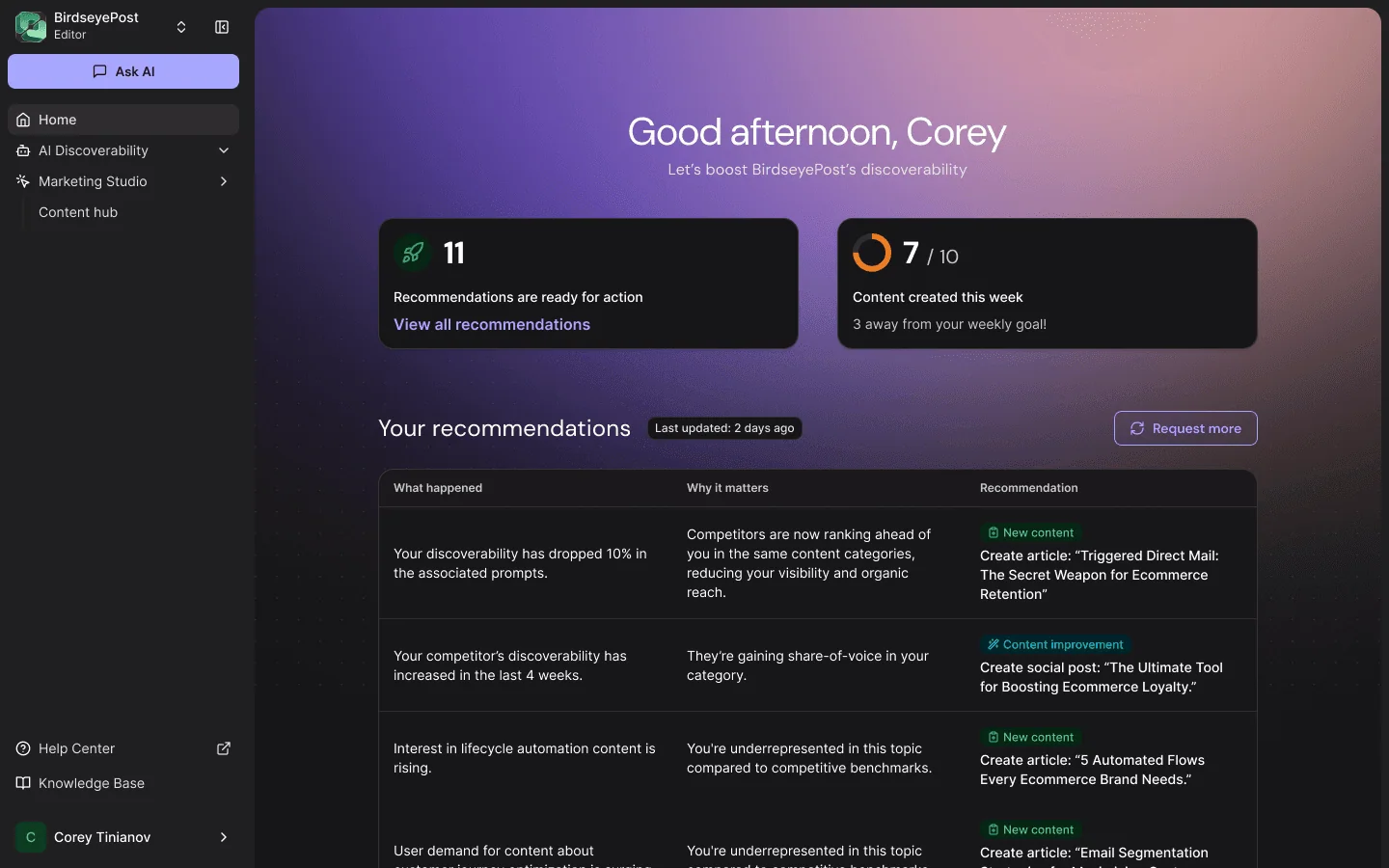
You don't need to go digging for these insights. Your prioritized recommendations stream directly onto your homepage. Each one is designed to give you a clear, concise summary so you can decide what to do next.
A recommendation will tell you:
What Happened: A simple statement describing the signal that was triggered (e.g., "Competitor X's visibility increased by 20% for 'best project management tool'.").
Why It Matters: The strategic implication for your brand (e.g., "You are at risk of losing share of voice for this critical topic.").
What We Recommend: A clear, actionable suggestion (e.g., "Create an article comparing project management tools for small businesses.").
From there, you can immediately create a brief directly from the recommendation in one click.
Taking Action on Recommendations
The workflow is designed to be fast and seamless. Recommendations can be actioned in one click to create content in the Marketing Studio.
Creating Content
When you decide to act on a recommendation, simply click the Create Content button. Yolando will instantly:
Generate a Content Brief that is pre-filled with the goal, title, target topics, and relevant source links.
Automatically mark the recommendation as "actioned" and move it into your Content Hub, where you can track its progress from brief to final draft.
Discarding Recommendations
If a recommendation isn't a good fit for your current strategy, click the Discard button. This removes it from your list and, more importantly, provides valuable feedback to the engine, helping it generate even better suggestions for you in the future.
Requesting Additional Recommendations
While new recommendations will stream onto your homepage automatically as they are identified, you also have the power to request a fresh analysis at any time. If you've cleared your list or simply want more ideas immediately, you can always ask the engine to generate a new batch for you on-demand.
What you can ask
Once Yolando is connected, try prompts like these to pull your data straight into the conversation:
“Give me my AI discoverability overview.”
“How am I cited across AI assistants?”
“Compare my visibility week over week.”
“Which sources mention my brand?”
Troubleshooting
Authorization didn’t finish
Reopen the Yolando connector and start the authorization again, then sign in with the Yolando account you want to use.
Which workspace does Claude see?
All of them. A single connection spans every workspace your Yolando account can access — you don’t switch accounts or reconnect to change workspace. Just tell the assistant which workspace you mean.
I don’t have the option to add a custom connector
Reach out to your IT team; your account is missing the necessary permission. Yolando is in the process of getting our MCP listed on the Anthropic & OpenAI directories.
Is my data safe?
Claude only reaches the workspace you authorize, and you can disconnect Yolando at any time from the connector settings.
Any other questions? Get in touch